Why I Won’t Be Attending or Speaking at Ubuntu Summit 25.10

Ubuntu Summit’s decision to go exclusively online, with the exception of those speaking at the Summit in London, UK, is anti-collaborative and turns its back on the very people who make Ubuntu what it is: its community of volunteers and developers. Ubuntu Summit was created from the dust of the Ubuntu Developer Summit in 2022 to recognize the community. It no longer serves that purpose.

As many know, I have been the lead of Ubuntu Studio for more than 7 years. I’m the longest-tenured Ubuntu Studio lead. I owe much of the foundation that was built to my predecessors: Luke Yelavich (founder), Scott Lavender, Kaj Ailomaa, and Set Halstrom. It is a true labor of love for me, and is the foundation for much of what I do.

I have worked myself through the ranks of Ubuntu, becoming a small-time packager for a small set of Ubuntu packages, then the Ubuntu Studio packageset, moving up to MOTU (Master of the Universe). I also served on the Ubuntu Community Council and am a current Discourse moderator.

Community and the love of people is a huge motivation for me. Granted, for those first four years, I hadn’t ever met the people I was collaborating with to make Ubuntu Studio what it is.

Then in August 2022, I was invited to attend the first ever Ubuntu Summit 2022 in Prague, Czechia. Having never travelled abroad before and never having even been off the continent of North America, itself a challenge as getting a U.S. passport is neither cheap nor easy, I was reluctant at first. Then I managed to get my passport, as well as the funds and passports to bring my wife and son to Ubuntu Summit.

That experience changed my life and the life of my entire family. My son, 10 at the time, was the youngest registered attendee. My wife was inspired to bring back Edubuntu, which had been defunct for nine long years by the time it was revived that following spring.

These are the things that happen when you have personal connections with people. If you’ve never read the book before, I encourage you to read Hardwired to Connect, which is a research paper published by a bunch of scientists. In essence, it says that people’s brains are wired, from birth, to engage in communities in for personal, in-person connections. It’s a scientific study that took years and is an excellent introduction to why we are the way we are.

Much of my education revolves around the very idea of building personal communities, which is one reason I was appalled when Ubuntu Summit, starting with 25.10, while it would be twice a year, it would be online-only except for the speakers. Having spoken at the past three, I was planning to take a year off from speaking, while still being there to represent as an Ubuntu Flavor Lead with my wife, also a now Flavor Lead.

If it weren’t for that initial Ubuntu Summit, in person, my wife and son would not have been as interested or as involved as they are today. The subsequent years only strengthened that involvement.

Now, it’s going to be an online-focused approach. I get it. It’s cheaper and easier. Also, those attending online were just watching a livestream anyhow. The Local Communities (LoCos) can get together on their own if they want to do a big event. It’s easier to reach more people if you do everything online.

Except it’s not.

For instance, the nearest active LoCo to me, in the Seattle-Tacoma area, is the Southern California LoCo. Meetups with them are logistically impossible. Same if I were to go to the Arizona LoCo; it’s just not possible. Most of the states in the United States are huge, so if there were one LoCo per state, it wouldn’t be correct. To be honest, I have no desire, time, or energy left to start and lead a LoCo in my area. Besides that, there used to be one for my state, but it’s long gone.

Furthermore, with the exception of me and my wife, us flavor leads are scattered to the globe. It used to be that we would meet online throughout the year every other month and then meet together once a year at Ubuntu Summit. That’s gone now.

Again, I get it. Canonical is a company that is and always has been majority remote work. Except for one thing: they get together twice a year in-person, and are even given T-Shirts to celebrate the immediately-prior release which was partially built by volunteers. Those of us who give our time, energy, and effort to the Ubuntu community aren’t given that in-person experience, let alone a T-Shirt. The very lifeblood of what makes Ubuntu so great isn’t given the ability to meet in-person. That’s been stripped from us, and it came as a complete surprise.

I’m not without ideas for solutions to problems, though. Rather than be completely destructive in this post, I can be constructive. My solution to this would be a compromise:

  • Have the Summit be in-person once a year following the yy.04 release
    • Have that one go back to being what it was. It can either have booths like 2024 did or go back to being talk/workshop-focused like years prior. It doesn’t matter, it just needs to be in-person.
  • Have the Summit be online once a year following the yy.10 release

I don’t think this is too much to ask. The reward of personal connections when doing something remote for most of the year is a small price to pay, no matter the cost. Personal connections are tantamount to a healthy community.

I think my compromise would prevent the Summit from dying just like the Ubuntu Developer Summit did once it went online-only. The way I see it is with the current status-quo, history is repeating itself.

I’m sure people at Canonical don’t see it this way because they meet with the people they work with the most twice a year. Those of us from the Ubuntu community that are developers aren’t given that luxury. We’re not even given that luxury once a year now. We’re not even given a T-Shirt!

Am I angry? A little. Do I feel betrayed by the very community I have given so much to over the years? Absolutely. Either way, I believe an online-only Summit is anti-collaborative in that it removes personal connections from the equation, which goes against the very fiber of my being.

Thank you for reading this, and I hope this reaches the people I’m trying to reach and have it speak for those who either won’t speak-up or don’t think they can make a difference.

Raspberry Pi as a Networked Audio Interface

I haven’t posted for quite some time, and a lot has happened. For instance, my wife revived Edubuntu and my work with Ubuntu Studio now spans over 7 years.

Recently, I became the proud owner of a Behringer X-Air XR18. This became the key to opening a new business, which I’ll announce at a later date. I’m working on acquiring more equipment to make this work.

As many people know, the XR18 is a stagebox-style mixer in which the mixer is physically on the stage with no controls but controlled with an iPad or Android tablet. However, as the owner of a Behringer X-Touch, which integrates seamlessly with an X-Air mixer via either MIDI or Network connections. In my situation, this gives the ability to have a physical front-of-house setup, with a computer showing the X-Air Edit application.

However, what if I want to multi-track record or add custom effects via Ubuntu Studio? This is where it would get complicated as I would then have to run a prohibitively-long USB cable from my computer to the XR18 on the stage. This would not be ideal.

As many people know, MIDI can be routed via network, which is the way the X-Touch, XR18, and X-Air app work together. A simple WiFi router and ethernet cable wouild be a great solution to this problem, but that also leaves an Ethernet cable prone to being tripped-over by audience members (unless one were to gaff it down). So, since we’ve already got WiFi, let’s take advantage of that.

To expose the audio ports to the WiFi, we’re going to have to bridge it. But… how? Most people would tell me just to use Dante but, unfortunately, Audinate refuses to support Linux, and AES67 support in PipeWire is very young. However, it turns out, JackTrip is in the Ubuntu repositories and, as its name would imply, integrates seamlessly with JACK and, therefore, PipeWire.

Setting this up is rather simple, and I’m documenting the process here.

Prerequisites

  • A Raspberry Pi 4 or higher (I have a late 2023 Raspberry Pi 5)
  • A micro SD card (16GB or larger)
  • Ubuntu Server for Raspberry Pi (I used 24.04, linked here).
  • Optional: Ubuntu Pro (for the RealTime Ubuntu Raspberry Pi Kernel)

Here we go…

The first thing I did was install the downloaded preinstalled server image to a micro SD card. This is accomplished using Raspberry Pi Imager. I used the Snap version maintained by Dave Jones of Canonical, part of Canonical’s Raspberry Pi team. If you’ve never met Dave, he does all of his computing via Raspberry Pi, and it’s a sight to behold!

To get that, it’s as easy as sudo snap install rpi-imager.

I made sure to set the server to automatically detect my WiFi, but if you plan to use a hard Ethernet connection, this isn’t necessary. Just be sure you can SSH into the machine as this is key (pre-set a user and set the machine name).

Once the SD card is imaged, I SSH’d into the machine (ssh erich@{computer-name}.local). The first thing I did was install jackd2 and jacktrip:

sudo apt install --no-install-recommends jackd2 jacktrip

One must use the --no-install-recommends option to avoid installing unecessary graphical tools as jackd2 will want to install qjackctl which is the GUI application to control JACK. We don’t need it here. JackTrip has an option to automatically connect to all inputs and outputs, so we’ll use that here.

To automatically start JACK upon boot, I modified this systemd unit file to be custom for my setup. You’ll notice I made the buffer 256 (-p 256) with 3 periods per buffer (-n 3) as gives the highest reliablility on a USB connection. Additionally, the highest frequency an XR18 runs at is 48000 Hz, so I made sure to set the frequency there (-r 48000). Also, we want the process to run in realtime and directly to ALSA (--realtime -dalsa):

[Unit]
Description=JACK server using %i user profile
Documentation=man:jackd(1)
After=sound.target local-fs.target

[Service]
User=%i
Group=%i
#Type=notify
EnvironmentFile=-/etc/jack/alsa.conf
#EnvironmentFile=-%h/.config/jack/%i.conf
ExecStart=/usr/bin/jackd --realtime -dalsa -p 256 -n 3 -r 48000
# -d $DEVICE $DRIVER_SETTINGS
LimitRTPRIO=95
LimitRTTIME=infinity
LimitMEMLOCK=infinity
# Caution: use on memory-limited devices only
# OOMScoreAdjust=-1000

[Install]
WantedBy=multi-user.target

I installed this to /usr/lib/systemd/system/jackd@.service.

Next, I created a systemd unit file to start JackTrip. I needed this to be a server (-s), with 18 inputs and outputs (for an XR18, -n 18) and automatically connect upon start (-q auto):

[Unit]
Description=JackTrip Audio Network Service
After=network.target sound.target jackd@%i.service
Wants=network-online.target

[Service]
# Run as a specific user who has JACK permissions
User=%i
Group=%i

ExecStart=jacktrip -s -n 18 -q auto --udprt
Restart=always
RestartSec=5

# Optional: environment for JACK if needed
#Environment=JACK_NO_AUDIO_RESERVATION=1

# Give JACK/JackTrip real-time priority
LimitRTPRIO=infinity
LimitMEMLOCK=infinity

[Install]
WantedBy=multi-user.target

I installed this to /usr/lib/systemd/system/jacktrip@.service.

Next, to make sure this runs as my user, I did the following:

sudo systemctl enable jackd@erich.service
sudo systemctl enable jacktrip@erich.service

Optionally, since this will be used as a headless appliance, one can use Ubuntu Pro to get the RealTime Kernel. This is accomplished by the following with an Ubuntu One account:

pro attach
pro enable realtime-kernel

To make sure everything worked, check pro status.

You can have up to 5 machines running Ubuntu Pro for free. In my case, as an Ubuntu Member, I can have up to 50 machines for free, and this is only my third one!

Once this is done, reboot. On your other machine, install jacktrip-gui. (This will be in Ubuntu Studio 25.10 and higher by default!): sudo apt install jacktrip-gui.

Opening it, it will ask you if you want to sign in with a Virtual Studio account. This is because JackTrip allows you to collaborate across the entire internet with fellow musicians with very low latency! It’s pretty cool! However, we don’t need that for this purpose. Instead, we’re going to say “No” and simply connect to the server as a P2P client:

Enter the computer name with .local afterwards, and it should find it as long as your desktop or laptop is connected to the same network as the Raspberry Pi.

After you click “Connect”, you should see this:

As you can see, this has audio coming in from a microphone already.

Back in X-Air Edit, already connected to the mixer, I changed my routing so channels 1 and 2 were being sent to the aux, so I can then use my computer’s audio there for music from e.g. Spotify:

Next I started a Dummy Audio Device from Ubuntu Studio Audio Configuration and made it the main output for the computer. I then connected the monitor of the dummy output to channels 1 and 2 of JackTrip using Patchance:

…and VIOLA! Even testing my microphone, there was so little latency it was imperceivable.

I’m envisioning a setup like this:

I’m excited to test this further! Overall, I feel like I’ve found a way to do a Dante-less audio-over-ethernet setup that cost me nothing!

Ubuntu Studio in the Christian Church

When I began working on Ubuntu Studio, I was working for a large church. We were doing amazing things in our services every Sunday. Our video, audio, and lighting were top-notch, but the problem was that it was hard to replicate without spending thousands of dollars.

This made me frustrated when running services for our youth in the church’s youth center. I couldn’t use those same tools and didn’t have a budget to spend. This got me wondering what tools existed in the open-source world. Remembering my days of experimenting with Linux and multimedia, I remembered seeing audio plugins in Ubuntu Studio, so that was the first place I looked.

Back then, I thought, “What would it take to replace all of these Apple and Windows computers with Ubuntu Studio?” We could use that money we would otherwise spend on software, on stage lighting, projectors, and audio equipment upgrades. Unfortunately, at that time, we were missing key components. While the audio was top-notch, it was lacking a good video editor and good software for controlling DMX-based lighting. This isn’t even to mention lyric and presentation software, which couldn’t hold a candle to ProPresenter.

Fast forward to now. Just four years later, those problems are being solved. We have some amazing audio plugins, and more keep coming to the repositories. Harrison’s MixBus is one of the best Digital Audio Workstations on the market and works flawlessly. Kdenlive, the video editor we include, has matured dramatically, and keeps getting better. Besides that, BlackMagic Design’s DaVinci Resolve is easy to install. For DMX lighting, we now have Q Light Controller Plus installed by default.

Lyric projection and presentation software out there was the final piece of the puzzle. Sure, OpenLP has been out there and has matured quite well, but it remains lacking in the usability department. However, I stumbled upon one thing that made me cry nearly tears of joy when I discovered it: FreeShow.

FreeShow

FreeShow reminded me of ProPresenter and operates very similarly. However, in some ways, it operates easier, because to set up another display, you just need a web browser to point it at the FreeShow presentation computer’s address. Same with the stage display. This was the application I had hoped would come about years ago.

FreeShow is being developed by Kristoffer Vassbø. It’s an application written in Electron. As such, to package it for Ubuntu, I had to go a non-traditional route and package it as a snap. This way, I could include it in Ubuntu Studio and complete the last piece of the puzzle for a full, out-of-the-box multimedia production system for churches. It will be included by default in Ubuntu Studio 22.10.

With that, I hope to find a church that would be willing to try Ubuntu Studio for its multimedia production needs. This could potentially save churches thousands of dollars per year that they could use for outreach in their local area, in their local region, or even to the ends of the earth!

This might be the unique ministry that God has been calling me to my whole life that I’ve been looking for.

Putting-On a New Hat

Before I began leading Ubuntu Studio, I was using a “spin” of Fedora called Fedora Jam. It was a musician/audio “lab” for Fedora which seemed to work well for me. Think of it as Ubuntu Studio minus the non-audio/music stuff, and with KDE Plasma instead of Xfce.

However, I knew of Ubuntu Studio’s importance in Linux-based production and creativity, and, as the story goes, I answered a call to help keep it alive.

Fast-forward two years. Ubuntu Studio is doing very well. I have a team that I rely on to keep things running. I decided to look at Fedora to see how they were doing, only to find out Fedora Jam had not been released for Fedora 31, and there was an un-responded-to keepalive request for Jam.

This got me thinking: what if something happens to Ubuntu Studio and Ubuntu/Debian became no-longer viable options for audio production? With that in mind, I decided to do something about it and stepped-in to become Fedora Jam’s new maintainer.

As it stands now, Fedora Jam 32 looks like it will be a thing, although not quite what I have envisioned. Hence, even now, I’m working on items for inclusion in Fedora 33 that should make it an excellent choice for audio production on Linux.

All this said, I want to make it clear: I am not leaving Ubuntu Studio. I am in a situation where I can adequately lead both Ubuntu Studio and Fedora Jam. Besides, this gives me a great deal of experience with packaging for Debian-based and .rpm-based Linux distributions.

Overall, I say this is a win-win for everybody who does audio production using Linux. I can take what I’ve learned in Ubuntu and apply it to Fedora and vice-versa.

My Linux Fest Northwest 2019 Story

I got back from Linux Fest Northwest 2019 on Sunday. Despite the horrible traffic to and from, it was a great time.

Friday Night Dinner

First thing I did was check-in to my hotel room, then I met up with Valorie Zimmerman (Kubuntu), Simon Quigley (Lubuntu), and quite a few others, including old friend Tyler Brown, and a few new faces such as Darin Miller.

From there Simon and I headed to the campus of Bellevue Technical College, the host of Linux Fest Northwest for this year and the previous 19 years. There were people eating and playing games around tables, and exhibitors setting up at their tables in the main exhibit hall. Although I was an exhibitor, I decided to set-up the next morning

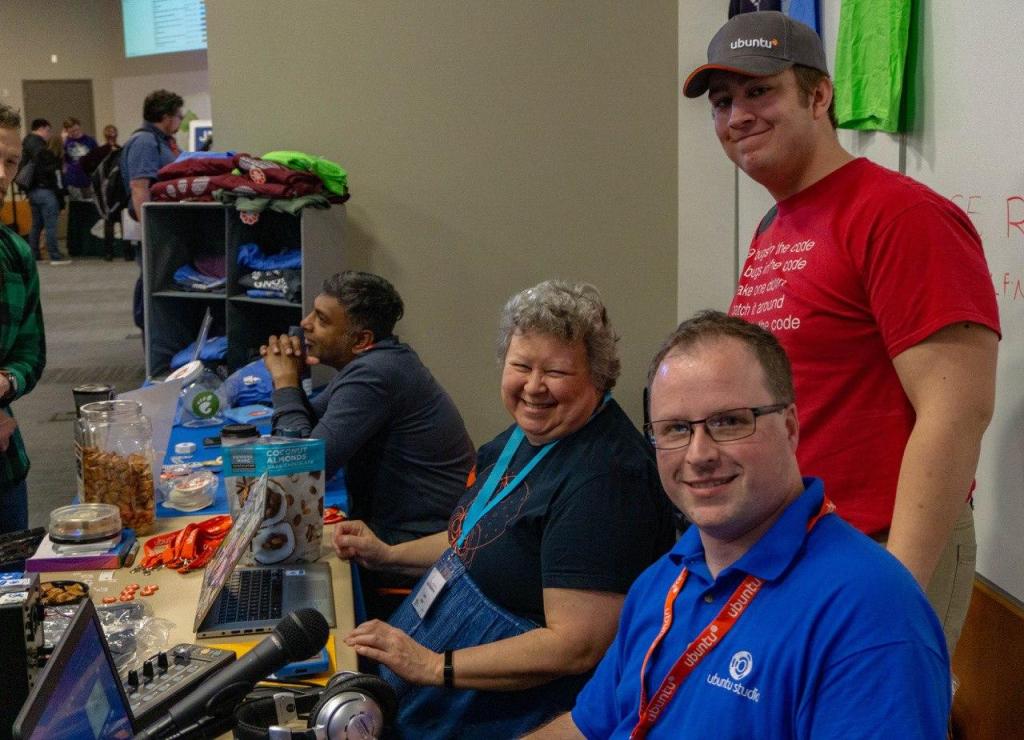
The Ubuntu table at Linux Fest Northwest 2019

So, bright and early, I got set-up in the main hall with my equipment to show-off Ubuntu Studio and its audio capabilities. Working the table was myself, Valorie, Simon, and Dustin Krysak (Ubuntu Budgie). But, after setting up, it was time for me to attend my first talk, given by Wes Payne of Jupiter Broadcasting about Audio on Linux. Was it any wonder that I chose that talk?

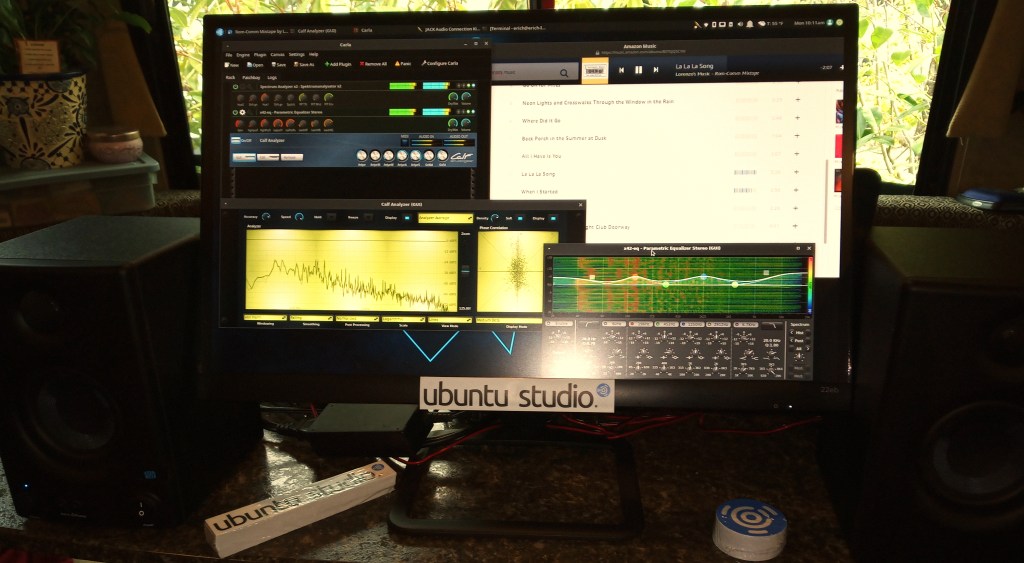
My Ubuntu Studio Demo Setup

After the talk, I spent time back at the Ubuntu table demonstrating Ubuntu Studio. I was amazed at how much attention it garnered, and had people asking me questions about it. Many had never even heard of Ubuntu Studio, and many thought the project had died. Those people decided to give it a nice look again, and some for the first time.

Afterwards, I watched Simon give a talk about “Open Source is More Than Just GitHub” and got to finally meet Alan Pope (Canonical) for the first time, even though we had communicated many times over the past several years.

Sri from GNOME, Valorie Zimmerman, me, Simon Quigley (standing). The GNOME table was right next to ours.

Then it was back to the Ubuntu table for more demos, answering questions, handing out stickers, and having great conversations. It was overall a great time, and Valorie has mandated that I join her at the Ubuntu table at SeaGL (the Seattle GNU/Linux Festival) in Seattle this year.

Before last talk of the day, I decided to tear down my equipment to keep from going back to the table. I attended Simon’s other talk: Ubuntu 19.04 Disco Dingo and Beyond. Unfortunately, I ran late and just as I walked in the room, Simon was talking about Ubuntu Studio. Apparently perfect timing, but took me a little while to get my bearings and get caught up. Being there I was officially in my role as a flavor lead along with Valorie, Simon, and Dustin, with Martin Wimpress (Canonical & Ubuntu MATE) and Alan giving Canonical’s perspective. The future of each flavor was talked about, and discussions were opened for each flavor lead to address any questions in the room.

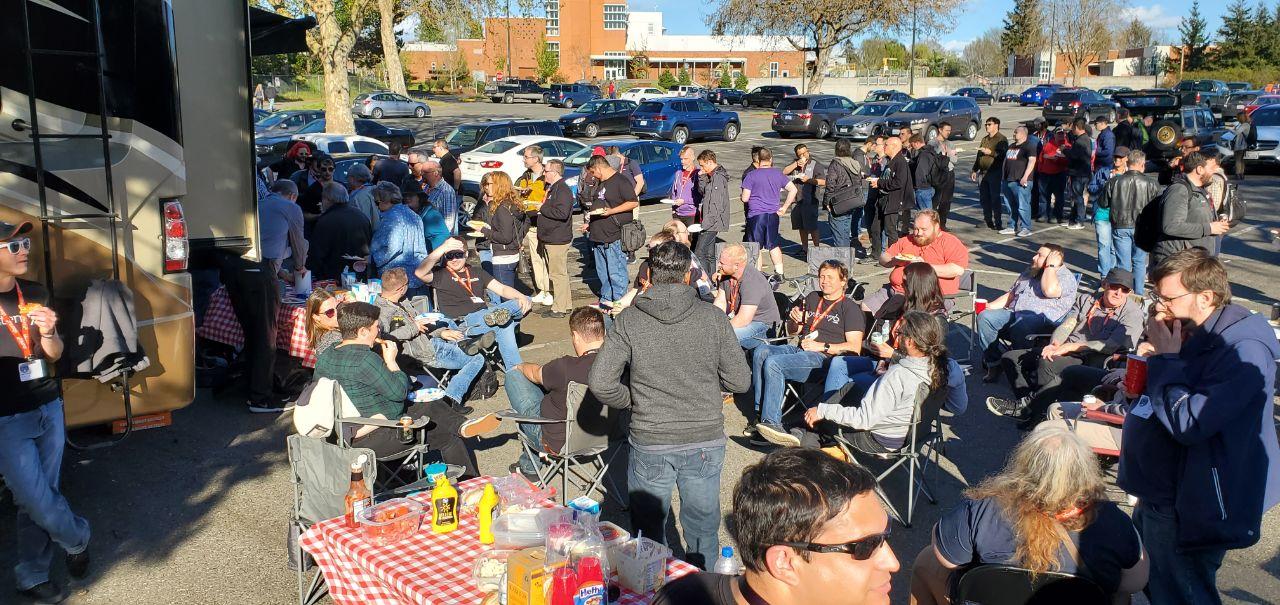
Barbecue by Jupiter Broadcasting and System 76 outside the world-famous “Lady Jupes” RV.

Afterwards, Jupiter Broadcasting and System 76 served a barbecue dinner for any that attended. It was a great time as I, formerly involved with Jupiter Broadcasting, got to catch up with old friends and meet new members of the community.

Simon Quigley, me, Martin Wimpress

I headed back to my hotel room fairly early while more shenanigans took place, I headed to bed. I guess night-time parties are quickly hitting my “Murtaugh List.” (I’m getting to old for this…. stuff.)

The next morning, I got to the college early and got my equipment set-up for more demos, which was pointedly more sparse as Sunday tends to be less busy. I headed to two talks that day. The first one I went to was by Ell Marquez entitled “Building Your Community by Poisoning Your Own Well”, where we learned her struggles with Impostor Syndrome, which is something I struggle with as well. Then I saw Emma Marshall’s talk entitled “sudo apt install happiness”, where she talked about System 76’s approach to customer service, which they call their “Happiness Team.” I couldn’t help but think of ways to use some of those methods when providing support to Ubuntu Studio users.

Afterwards, I headed to the Ubuntu table to pack-up and then head to the final keynote for Linux Fest Northwest 2019, which was a Q&A session with John “Maddog” Hall, Kyle Rankin, and our very own Simon Quigley. Once done there, I headed back to the hall, grabbed anything that was left, said goodbye, and headed home.

Overall, it was a great experience, and I plan to go again next year. Next stop, whether I want to or not per Valorie, is SeaGL 2019.

Gearing Up for Linux Fest Northwest 2019!

This next weekend (April 26-28th, 2019) I will be in Bellingham at Bellingham Technical College for Linux Fest Northwest to help at the Ubuntu table!

I will be demonstrating Ubuntu Studio and my audio setup.

I also have a few giveaways for fans of Ubuntu Studio fans. After all, nearly everybody loves vinyl stickers.

I even put a couple of them on my pickup truck! (The Tux sticker is from HelloTux, where you can pick up some amazing Ubuntu Studio clothing!)

I look forward to seeing you there! Also attending (that I know of) will be Valorie Zimmerman (Kubuntu), Dustin Krysak (Ubuntu Budgie), Simon Quigley (Lubuntu), Martin Wimpress (Ubuntu MATE, Canonical), and Alan Pope (Canonical). It’s going to be a blast!

One Year Leading Ubuntu Studio

I hardly know how to describe this entire past year. If I had one word to describe it, that would be “surreal.”
Just a little over a year ago, I answered a call to put together a council for Ubuntu Studio. The project leader at the time couldn’t commit the time to lead, and the project was failing. As someone who was using open source software for audio production at the time, and at the time using Fedora Jam, I saw Ubuntu Studio as too important of a project to let die. I just had no idea how dire the situation was, or how it had even ended up that way.
With the release of 18.04 LTS Beta around the corner, I knew something had to be done, and fast. So, I jumped-in, feet first.
Ubuntu Studio, as it turns out, was on life support. It hadn’t been worked on, save a few bugfixes here and there, for two years. Many considered it a dead project, but somehow, the plug never got pulled. I was determined to save it.
I had many connections and sought a lot of advice. We got the council going, and since I was running the meetings, I became the chair. Then, I acted as the release manager. However, I wasn’t quite comfortable with signing-off on a release that would be supported for three years. I was advised by those already involved with the Ubuntu release team that it might be a good idea to have Ubuntu Studio 18.04 be a non-LTS. I presented this idea to the council, and they agreed.
Ubuntu Studio 18.04 “Bionic Beaver” was released as a non-LTS. The community was unhappy with this decision since now that meant those that only use LTS, especially in professional applications, were feeling left out. Eventually we figured out a solution, but not until much later, and that became the Ubuntu Studio Backports PPA.
During the 18.10 release cycle, we got the development ball rolling again. Len Ovens worked on a new version of Ubuntu Studio Controls that would do something that no other tool for configuring audio on Linux had been done before: adding/removing USB devices from the Jack Audio Connection Kit (Jack) as they are hotplugged, and allowing Jack to use more than one audio device simultaneously. It’s truly something that can revolutionize how audio is done with Linux. Eylul Dogruel made an amazing backdrop wallpaper, originally intended for 18.04. She and Thomas Pfundt helped with the Ubuntu Studio Wallpaper Contest, the winners of which landed in 18.10.
We had a vision during that release cycle of adding an additional desktop environment. Unfortunately, that turned out to be more work than it was worth. So, we scrapped that idea and instead of bringing a new desktop environment to Ubuntu Studio, we decided the opposite should happen: bring Ubuntu Studio to the other desktop environments. This manifested in a repurposing of the Ubuntu Studio Metapackage Installer. Len and I worked on this, renamed it to the Ubuntu Studio Installer, and got something working for the 19.04 release. Now, Ubuntu Studio has become an operating system and a toolkit.
Then there was the vision to add more tools to Ubuntu Studio and replace some old ones. The Calf Studio Gear plugins were outdated in 18.04 and 18.10. Working with Ross Gammon, we got that fixed upstream in Debian, which then trickled-down and landed in 19.04. Then there was the challenge to add Carla, an audio plugin host and patchbay, to the Ubuntu repositories. In the past this had been prohibitive. It took me almost a year, but I finally got it packaged (with the help of the upstream developer, Ross, and several others in the Ubuntu community). Now, it’s available in 19.04.
Unfortunately, we had done all of this work, but had nobody to upload to the Ubuntu repositories. I started speaking out. When I got no response, I escalated things. Eventually, it got to a member of the technical board who, upon hearing that Ubuntu Studio had no uploaders, realized that it was not able to function as an official flavor. Remember that life support Ubuntu Studio was on? Ubuntu Studio had just gone “Code Blue.” Ubuntu Studio was about to die.
Within a week, Ross and I were able to get upload privileges for the key parts of Ubuntu Studio. Then, two weeks later, Ross got upload privileges to the Ubuntu Studio Package Set, which is everything in Ubuntu Studio not shared with other flavors.  With that, Ubuntu Studio has made a big recovery.
What’s next? Len and I agree that we’d like to make it so that nobody who runs Ubuntu Studio thinks they need to add the KXStudio repositories to have a complete audio setup. We want to keep making it a full-fledged audio, graphics, photography, and video workstation. We want to be the choice for creative-types everywhere. We just hope others want to join us on this journey.
As for myself, I cannot tell you how much “Imposter Syndrome” I’ve experienced. Oftentimes, I don’t believe I’m deserving of such a high leadership position within the Ubuntu community. Me, and audio engineer / video producer / photographer from Microsoft’s back yard, would be leading the world’s most popular multimedia creation operating system. Surely, others are more qualified. Yet, here I am. It’s a good thing others believe in me, even when I can’t.
So a special thanks to those people (in no particular order): Len Ovens, Eylul Dogruel, Thomas Pfundt, Set Hallstrom, Ross Gammon, Simon Quigley, Valorie Zimmerman, Dustin Krysak, Martin Wimpress, Alan Pope, Jeremy Bicha, Walter Lapchynski, Mathieu Truedel-Lapierre, Thomas Ward, Keefe Bieggar, and anybody else I’ve missed.
And of course, thanks to my wife and son who have had to put up with me though all of this geeking-out.
Here’s to another year.